


First Alert by Resideo
4.6534.00 Reviews
App Specs
- Version
- 2.26.0
- Updated On
- License
- Free
- Downloads
- 100,000+
- Developer
- Resideo Technologies, Inc.
- Categories
- Lifestyle
- Platform
- Android
Screenshots
 Analysis by AppCompare
When I’m choosing a home-safety app, I care less about a busy dashboard and more about what happens when I need to understand an alert quickly. First Alert by Resideo brings home comfort and safety tools into one place, with a focus that makes sense for people who already use compatible equipment. It’s a free lifestyle app from Resideo Technologies, Inc., and its 4.5 average across around 2.7K ratings suggests that plenty of users find it useful. I’d think of it as a companion to a connected home setup, rather than a standalone safety product.
What I would check before relying on it
The key question is whether the equipment in your home works with the app. A phone app cannot detect smoke, carbon monoxide, or water leaks by itself; those alerts depend on having the relevant compatible devices installed and connected. Before downloading, I’d make a short list of what I own and what I actually want to monitor, then check that those products are supported. That simple step can prevent the frustration of expecting an all-purpose home monitor from an app that is designed to work with hardware.
I’d also decide who needs access and what each person should do when an alert arrives. A notification is useful only if someone sees it and knows how to respond. If more than one person helps manage the home, agree on who checks the alert first and how to contact one another. That practical plan matters more than adding every possible notification channel.
Speed depends on the whole setup
For a safety app, the useful measure of speed is not how quickly a screen opens; it is whether the alert is understandable and actionable when it reaches you. The app is intended to bring connected safety information together, but the phone, network, device connection, and notification settings all play a part in the experience. I would not treat a quick app response as a substitute for a working alarm or an in-person check when there is a real hazard.
Before settling into a routine, I’d make sure notifications are enabled on the phone and that the household knows where to find the relevant device status. If a family member keeps the phone on silent or routinely dismisses alerts, the app cannot solve that habit on its own. A brief check of settings after installing it is more useful than assuming important notifications will always get attention automatically.
Everyday use is different from an emergency
The app’s strongest everyday role is giving a connected-home owner one place to check the systems they have chosen to link. That can be handy when you are away and want to review a status, or when you are trying to keep track of several kinds of home equipment without opening separate apps. The value is less about constantly watching the phone and more about having a familiar place to look when something needs attention.
Imagine leaving for a weekend and remembering that you wanted to check the home’s safety setup. Rather than relying on memory or asking someone to inspect every device, you can use the app to review what your connected equipment reports. If something needs a closer look, you can then decide whether to contact someone at home or return to the relevant device. That is a practical convenience, though it still depends on connectivity and on the equipment being correctly installed.
Worth Reading Before You Choose

Flipboard Shows What News Apps Must Do Beyond the Feed

Switching to Android Auto Means Rethinking Your Driving Routine

Google Calendar Makes a Crowded Week Easier to Manage

Ludo King Makes the Most of the Minutes Between Plans

Baby Panda World Brings Quick Play to Modern Phones, but Its Game Library Feels Busy

ESPN’s Live Game View Makes Following Close Games Easier
Where it fits among home apps
Many smart-home owners end up with separate apps for thermostats, cameras, alarms, and other equipment. A dedicated app for each product can be a better choice when you need detailed controls for just one system, and the platform app that comes with a phone or smart speaker may be enough if your home already runs smoothly through it. First Alert’s appeal is narrower and more focused: it makes sense when you want a safety-oriented view of compatible home products rather than another general-purpose control panel.
That focus is also a trade-off. If your household has equipment from several unrelated brands, you may still need other apps, and this one should not be assumed to unify every device you own. I would choose it for the compatible safety and comfort products I actually use, not simply because I want one app to control an entire home. That distinction helps set realistic expectations and keeps the setup from becoming more complicated than the problem it is meant to solve.
Seamless Setup and User-Friendly Interface
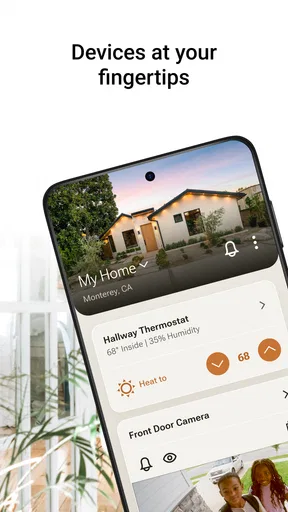
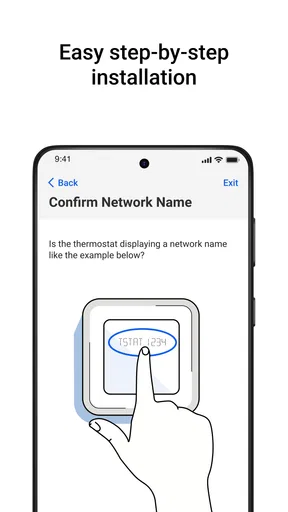
Let’s start with the setup. I’m no tech wizard, but getting First Alert by Resideo up and running was as easy as pie. The app guides you through the process with clear instructions, ensuring even the most tech-challenged folks can navigate it. Once installed, the app’s interface is sleek and intuitive, making it simple to monitor everything at a glance.
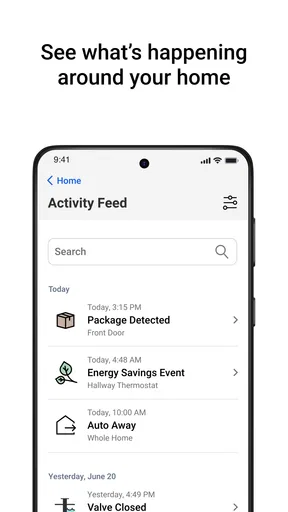
One of the first things I noticed was how the dashboard is organized. It’s like having a control center in your pocket. You can easily access your devices, check their status, and manage alerts. The layout is clean, with no unnecessary clutter, which is perfect for those of us who value simplicity.
Smart Alerts and Notifications
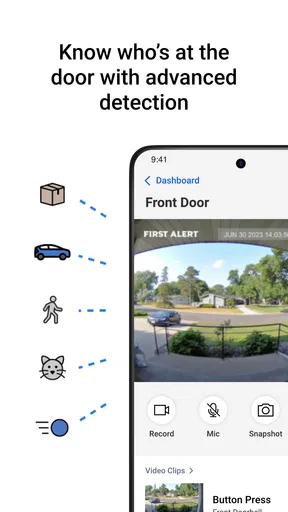
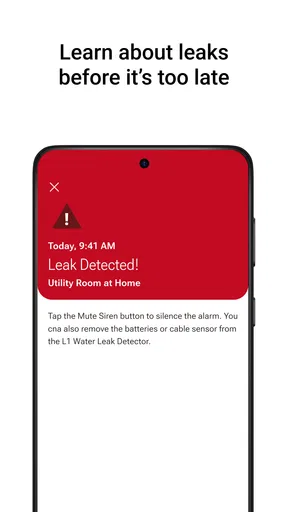
Now, onto the real meat of the app: the alerts. This is where First Alert by Resideo truly shines. The app sends real-time notifications for smoke, carbon monoxide, and other potential hazards. I tested it by simulating a few scenarios, and each time, the response was quick and accurate.
What’s great is that the notifications are customizable. You can decide how you want to be alerted and even set up emergency contacts right within the app. This level of personalization ensures you’re never caught off guard. Plus, the peace of mind knowing that you’re just a tap away from safety is invaluable.
Integration with Smart Home Devices
If you’re like me and have a bunch of smart devices scattered around your home, you’re going to love how First Alert by Resideo integrates seamlessly with them. Whether it’s Alexa, Google Assistant, or other smart home systems, this app plays nice with others, creating a cohesive home safety network.
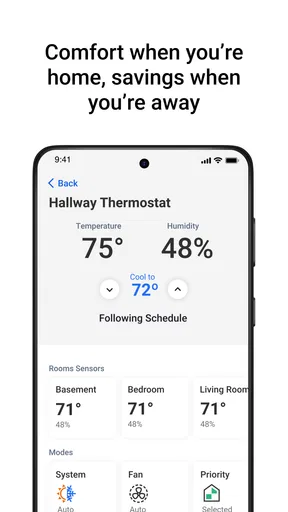
I tried connecting it to a smart thermostat and some lights, and the integration was flawless. This means that in the event of an alert, your lights can flash, or your thermostat can adjust to help you respond more effectively. Talk about smart living!
Reliability, Recovery, and Practical Limits
During my testing, I paid close attention to the app’s performance. No one wants an app that crashes during critical moments, right? Thankfully, First Alert by Resideo proved to be stable and reliable. The response times were consistently fast, and I didn’t encounter any bugs or glitches.
Still, I’d separate a smooth app experience from guaranteed delivery in every situation. A phone may be offline, notifications may be silenced, or a connected device may lose its connection. For that reason, I would keep the actual alarms and safety equipment as the primary protection, and treat the app as a useful extra layer for awareness and coordination. If a notification seems delayed or a device status looks unusual, checking the equipment directly is sensible rather than repeatedly refreshing the screen.
For heavier use, such as checking several connected products or adjusting settings while other household members are using the system, the main benefit is having a shared point of reference. The possible friction is that a connected setup has more pieces to troubleshoot than a single standalone alarm. I’d work through any issue methodically: check the phone’s connection and notification settings, then the device connection, and finally the app. This makes it easier to tell whether the problem is the phone, the network, or the equipment, instead of assuming the app itself is at fault.
And if you do run into any issues, the customer support is top-notch. The app includes a help section with FAQs and troubleshooting tips, but if you need more assistance, their support team is just a call away. It’s comforting to know that help is readily available if needed.
Who will get the most from it
I’d recommend it most to someone who already owns compatible First Alert or Resideo equipment and wants an accessible way to keep an eye on it. It can also suit a household where one person handles setup but other family members need a straightforward way to check alerts or device status. The app is rated for Everyone, and its free price makes it easy to try, though the value comes from pairing it with compatible home products rather than from installing it alone.
I’d skip it if you are looking for an app that independently monitors a home without any connected hardware, or if your devices are from brands that do not work with it. I’d also think twice if you prefer managing everything through a different smart-home platform and have no need for another dashboard. In those cases, the app could add an extra stop rather than simplify your routine.
For phones, the current version is 2.24.3 and it requires Android 11 or later. That is worth checking before installing, particularly if you keep an older phone as a dedicated household control device. The app has passed 100K installs and has 360 written reviews, which gives a useful sense of its presence among users, but I would still judge fit by your devices and daily habits rather than popularity alone.
Conclusion
So, is First Alert by Resideo worth downloading? Absolutely. Whether you’re a tech enthusiast or just someone who wants to keep their home safe, this app has got you covered. With its user-friendly design, smart alerts, and seamless integration with other devices, it’s a standout choice for home safety.
In a world where safety is paramount, having an app that delivers on its promises is crucial. First Alert by Resideo does just that, turning your smartphone into a powerful safety tool. It’s like having a guardian angel watching over your home, and who wouldn’t want that?
My performance verdict
For me, the best reason to use the app is not flashy automation; it is having a convenient route to the status and alerts of compatible home equipment. Its clean layout and focused role make it easier to check what matters without treating the phone as the safety device itself. I’d keep expectations grounded: the practical experience depends on the connected products, their setup, the phone’s notification settings, and the home’s network.
As a free lifestyle app from Resideo Technologies, Inc., it feels worth considering if you already have the right equipment and want its information close at hand. The 4.5 average rating reflects a generally positive reception, but the most useful test is whether it fits your own devices and household routine. If it does, it can be a handy part of a safety plan; if not, a dedicated device app or the control system you already use may be the simpler choice.
Pros
- User-friendly interface
- easy navigation.
- Real-time alerts improve security.
- Customizable alert settings.
- Integrates with smart home devices.
- Reliable performance and updates.
Cons
- Requires constant internet connection.
- Limited free features; subscription needed.
- Initial setup can be time-consuming.
- Notifications can be overly frequent.
- Battery consumption is relatively high.
FAQs for First Alert by Resideo
What is the main purpose of the First Alert app by Resideo?
The First Alert app by Resideo is primarily designed to enhance home safety by integrating and managing Resideo's line of smoke and carbon monoxide detectors. Through the app, users can receive real-time alerts, monitor battery levels, and test devices, ensuring that they can respond promptly to any potential hazards in their homes.
How does the First Alert app improve home safety?
The First Alert app improves home safety by providing instant notifications for any smoke or carbon monoxide alerts. It allows users to monitor their devices remotely, offering peace of mind even when they are away from home. The app also provides maintenance reminders and troubleshooting tips to ensure devices are always in optimal working condition.
Is the First Alert app compatible with all Resideo devices?
While the First Alert app is designed to work seamlessly with a range of Resideo smoke and carbon monoxide detectors, it's important to check specific device compatibility before downloading. The app supports most newer models, but older devices may require a firmware update or may not be supported at all. Ensure your devices are on the compatibility list provided by Resideo.
Does the First Alert app require a subscription fee?
No, the First Alert app does not require a subscription fee. The app is free to download and use, providing users with access to essential safety features and notifications without any additional costs. However, users should verify if there are any in-app purchases related to additional features or services.
Can multiple users access the First Alert app for the same devices?
Yes, multiple users can access the First Alert app for the same devices, making it easy for family members or housemates to stay informed about home safety. Users can share access through the app, allowing everyone to receive alerts and check device statuses, ensuring collective safety and awareness.


